
Registering takes a few minutes. Our team then verifies the account, usually within 24 hours, before you can log in.
Before you start
- Use your company email address. It is how we confirm you represent the company.
- Invited to a tender? Register with the email address the invitation was sent to, or another address on the same company domain. Accounts registered this way are approved immediately: you skip the questionnaire and receive the Your account is ready email straight away.
- Does your company already have an account? Each username and email address can only be registered once. If a colleague already has the account, ask them to add you or see How do I transfer ownership of a TenderBoard account?.
Step 1: Fill in the registration form
Go to www.tenderboard.biz/user/register?type=supplier.
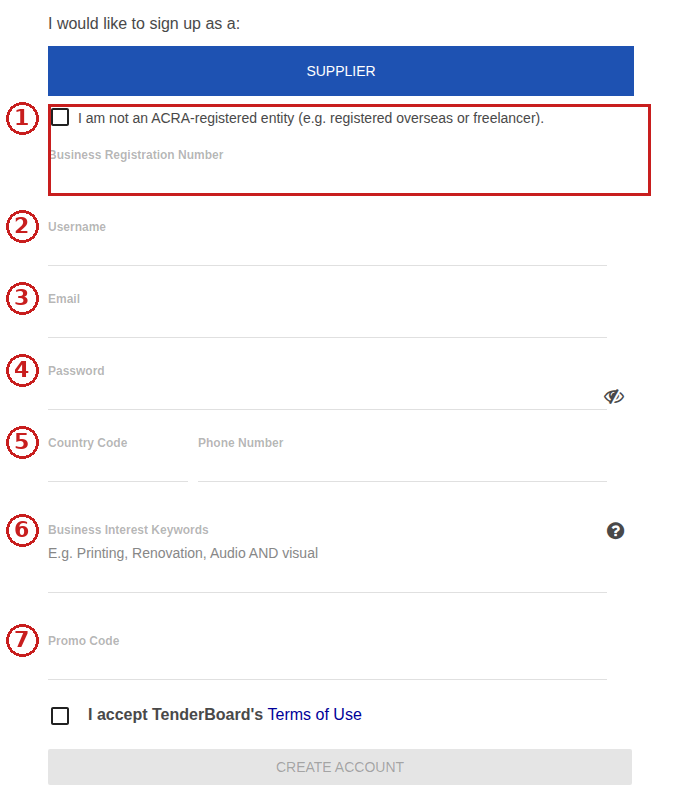
- Business Registration Number (UEN). Your company's legal name is filled in automatically from the UEN. If you see "The BRN is already registered to another company. Did you mean to put ...?", your company already has an account under that name: use it, or contact support. Not ACRA-registered (overseas company, freelancer)? Tick I am not an ACRA-registered entity and type your company name instead.
- Username. This becomes your login ID. You can also log in with your email address.
- Email. All notifications and tender invitations go here.
- Password. At least 8 characters with an uppercase letter, a lowercase letter, a number and a symbol.
- Country code and phone number.
- Business Interest Keywords describing what you supply. We use them to send you relevant tenders. See What keywords should I add to my account?.
- Promo code (optional).
Tick the terms of use and click Create Account.

Step 2: Complete the questionnaire
Unless you were invited (see above), you are taken to a short questionnaire: your registration number, your ACRA business profile if you have it, and a few questions about your company. Our team uses this to verify the account, so complete it straight away. If you close it, we email you Your TenderBoard Account Registration is incomplete with a Complete Registration link. The link is valid for 30 days, but we cannot verify your account until the questionnaire is done, so complete it as soon as you can.

Step 3: Wait for verification, then activate
- You receive TenderBoard Registration: We are setting up your account, please give us a moment. straight away. Nothing to do yet.
- Within 24 hours you receive TenderBoard Registration: Your account is ready.. Click Verify Account and Login, enter the password you chose and your designation, and click Verify My Account. See How do I verify my email address to login?.
If we need more information we email you separately.
Need the account urgently for a tender?
Email support@tenderboard.biz with the deal reference number and the email address you registered with, and we will prioritise the verification.
Common problems
- "The name is already taken" or "The e-mail address is already registered". An account exists with that username or email. Use Forgot your password? on the login page to regain access, or ask the colleague who registered it.
- No emails from TenderBoard. Check your spam folder and ask IT to allow tenderboard.biz. See I'm not receiving TenderBoard emails.
- No UEN (overseas company, sole proprietor, freelancer). Tick I am not an ACRA-registered entity on the form; the UEN field is then not required. Our team will email you for proof of your business before approving the account.
- Company name needs to change after registration. Email support@tenderboard.biz with your ACRA profile showing the new name.
Once your account is active, read How do I submit a bid on TenderBoard and learn about the Supplier Portal features.